Tuesday, June 9, 2009

How Computer RAM Works?


Similar to a microprocessor, a memory chip is an integrated circuit (IC) made of millions of transistors and capacitors. In the most common form of computer memory, dynamic random access memory (DRAM), a transistor and a capacitor are paired to create a memory cell, which represents a single bit of data. The capacitor holds the bit of information -- a 0 or a 1. The transistor acts as a switch that lets the control circuitry on the memory chip read the capacitor or change its state.

RAM stands for Random Access Memory. This means Information can be retrieve and store by the computer at any order. RAM gives your computer a temporary place to process electronic data. This means that, RAM chips continue to store information only as long as computer has electrical power. In other words, when you shut off your computer, all the data stored in RAM are lost.
All actual computing starts with the the CPU (Central Processing Unit).

The chipset supports the CPU and contains several controllers that control how information travels between the CPU and other components in the PC.

The memory controller is part of the chipset and establishes the information flow between memory and the CPU.

A bus is a data path that consists of parallel wires and connects the CPU, memory and other devices. The bus architecture determines how much and how fast data can move around the motherboard.

The memory bus goes from the memory controller to the computer's memory sockets. Newer systems have a frontside bus (FSB) from the CPU to main memory and a backside bus (BSB) from the memory controller to L2 cache.

For the PC to get information...

The CPU sends a request to the memory controller to memory and gets a report back of when the information will be available. This cycle can vary in length according to memory speed as well as other factors, such as bus speed.

Residing on the motherboard, the system clock sends a signal to all components, just like a metronome ticking. Each click of the clock represents a clock cycle. A clock running at 100Mhz represents 100 million clock cycles per second. Every action is timed by the clock where different actions require a different number of clock cycles.

Many people assume that the speed of the processor is the speed of the computer. Most of the time, the system bus and other components run at different speeds. Because all information processed by the CPU is written or read from memory, the performance of a system is dramatically affected by how fast information can travel between the CPU and memory. Therefore, faster memory technology contributes greatly to the overall system performance.

Cache memory is a relatively small amount (normally less than 1 MB) of high speed memory and resides very close to the CPU. It is designed to supply the CPU with the most frequently requested data. It takes a fraction of the time, compared to normal memory, to access cache memory.

The concept is that 20% of the time, what is needed is in cache. The cache memory tracks instructions, putting the most frequent used instruction at the top of the list. Once the cache is full, the lowest need is dropped.

Today, most cache memory is incorporated in the CPU. It can also be located just outside of the CPU. Cache that is closest to the CPU is labeled Level 1, the next closest Lever 2, etc.

Interleaving is a process in which the CPU alternates between two or more memory banks. Every time the CPU addresses a memory bank, the bank needs about one clock cycle to reset. The CPU can save processing time by addressing a second bank while the first bank is resetting.

RAM

RAM may also be called "Memory" and it is measured in Megabytes (or MB).

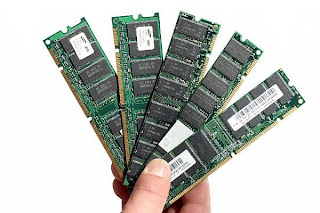
RAM comes in the form of computer chips. These chips plug into special connectors in your computer. The purpose of these chips is to provide fast storage for the computer to use.

When the computer loads your file from your hard drive - where does that information go? It makes a copy of the information from the hard drive and places it in RAM.

Why? For speed. Information in RAM is stored based on electrical signals... so to change information simply requires sending a different electrical signal to the chip. This happens very quickly. Remember, the hard drive is a physical object that is spinning. It takes time to start it spinning, and move the hard drive "head" to the right position.

Let's say you are typing in a Term Paper in your Word Processor. Every key you press on the keyboard becomes part of your Term Paper. You don't realize it but, every letter you press has to be remembered by the computer. It accomplishes this by saving those keys in RAM. It happens so quickly, you don't even notice it.

So it's fast... but what happens when you turn off your computer? All the information is lost since the electrical signals storing the information have been turned off.

Advantages:
Fast

Disavantages:
"Forgets" when you turn the computer off
More expensive than hard drive storage.


Ramdom Access Memory (RAM)


Types of RAMs

The most widely used RAMs today are SRAMs (static RAMs), which stores data in a state of a flip-flop, or DRAMs (dynamic RAMs), Flash, and EPROM, which stores data as a charge in a capacitor. Another well known type of RAM, a ROM, is a type of a RAM that has permanently enabled/disabled selected transistors by using a metal mask. ROMs thus cannot store any further charges.

Flash memory is also widely used. Because SRAMs and DRAMs are known to be highly volatile, many new products adopt the flash memory technology. Some examples of devices using flash memory include portable music players, scientific calculators, mobile phones, and even certain types of personal computers such as the One Laptop per Child (OLPC) devices. Flash memory is divided into two types: the NOR type and the NAND type. The NOR type is the one able to conduct a random access, therefore being widely used as a ROM in today's market. However, as the NOR is not able to, it is often used in flash USB drives.

In today's computers, RAMs are shipped in a form of module known as DRAM modules or memory modules. It is about the size of a chewing gum and with the Plug n Play technology, these can easily be replaced by taking it out of the port and replacing it with a new one. Not to forget, there is also an extremely small amount of RAM (known as SRAMs) within CPUs, motherboards, hard drives, and other parts of the system.

RAM Swapping

Sometimes people will need more memory than what the RAM installed can offer during intensive application cycles. During these sessions, the computer will conduct a task known as swapping. This is when the computer temporarily uses the hard drive space in place of the memory. Thrashing is the term for constantly swapping, but as the name's connotation suggest, constant thrashing can decrease the overall system performance. More RAM being added can reduce the swapping rate.

RAM is an abbreviation for Random Access Memory. It usually refers to "temporary" memory, as when the system is shut down, the memory is lost. This is why the memory is referred to as being "random," as any piece of information can be circulated through the memory regardless of its location and its relation to any other information within the RAM. The first of the many RAMs to come in the future was created in 1951 and was used until the late 1960s and early 1970s

Security Concerns

SDRAMs are known to not fully shut off when the power is cut. Instead, the stored memory is faded away. While this fading away only takes seconds in a normal room temperature, which is not the case in lower temperatures, which then the fading away can take up to minutes. Therefore, encrypted information could potentially be leaked as it is still stored in the memory.

Recent Developments

Currently non-volatile RAMs are under development, which will mean that memory can still be stored when the power is shut off. The more advanced step yet to have been taken was in 2004 when Nantero developed a fully functioning carbon nanotube memory type holding 10 GB. Recently in 2006, "Solid State Drives" with sizes of 150 GB and a faster speed than the normal hard drives have been created.


Monday, June 8, 2009

Computer Software


This page is an attempt to specify why I do not consider computer software to be speech nor software to be merely the algorithms it contains. The consequences of this are far reaching - much of the GNU philosophy is undermined (especially the GPL), software patents look even worse than before and the use of copyright law to protect computer software becomes obviously a poor choice.

We need a complete overhaul of Intellectual Property law for anything which can be wholly represented within a computer eg; computer software, music, video, books etc. Computers can copy data upon them for near-zero replication cost and thus enable a hitherto unknown paradigm of data plentifulness whereas before there was data scarcity. Attempting to enforce data scarcity in a world where that just doesn't exist anymore proves that current IP law has been made obsolete by computer technology - and this includes computer programs themselves.

If you have difficulty with the below, please refer to the logic of Wittgenstein & Bertrand Russell and Geoffrey Chew's bootstrap synthesis of quantum mechanics. The Web Of Life by Fritjof Capra is also recommended. I'm also no formally trained logician, so the below is not framed very formally and I'm sloppy with my language - but I don't think I've made any typing errors - my assertions are correct. Feel free to email me if you think I'm wrong.

1. Computer software is more than the algorithms it contains:

I assert:

  1. A human or CPU can execute a problem solution in software
  2. Only a human can execute a problem solution in speech1
  3. Only a human can execute a problem solution in maths2
[1]: Speech here means ordinary language as used by an ordinary human with no special training eg; expertise in maths or some academic qualification. See below for why speech is a subset of computer software.

[2]: Maths here is pure maths (algorithms), not formal specification - which is in fact computer software as we shall shortly see. Maths is an abstract concept unrelated to physical laws of the universe.

If you disagree with (iii), how do you execute the bubble sort algorithm? In maths (I've forgotten the symbols) it goes like: for each item indexed I in sequence, if item[I] is smaller than item[I+1] swap. Iterate until no swaps made.

Functionally written in Haskell, it would be something like:

bubble [] = ([], False)
bubble [x] = ([x], False)
bubble (x:xs) =
hanged) = bubble xs in if x
let (y:ys,
c > y
then (y:x:ys, True)
bsort ws = let (zs,
else (x:y:ys, changed)
changed) = bubble ws
in if changed
then bsort zs

else zs
You're probably thinking that's identical - however it's not. If a human executes the bubble sort algorithm, they are filling in typing gaps eg; is X smaller than Y? What is an X and what is a Y? Computer software is algorithms plus context ie; how to apply the algorithm ie; software iscontextualised algorithms. No matter how high-level a functional language can get (and Haskell is about as far as it currently goes), all implementations of an algorithm must be contextualised to run unaided ie; execute without a human. We programmers supply that contextualisation without even thinking about it because we know what types Haskell knows already about and if it doesn't, what extra contextual information which needs adding.

What is context? Context is how algorithms are related to each other. If you extend the self-referential model sufficiently (eg; defining everything), you get computer software. It has now though become more than the mere sum of its parts ie; the aggregate has extra value through being an organised aggregate of parts ie; its organisation or set of relations between the parts is the +1 factor.

2. Computer software is not speech

I assert:

  1. Algorithms is a superset of speech1
  2. Computer software is algorithms + context
  3. Therefore software is not speech
[1]: The New Elizabethan Reference Dictionary defines speech as: The faculty or act of uttering articulate sounds or words; that which is spoken, an utterance, a remark; a public address, an oration; the language or dialect of a nation etc.; the sounding-quality of a musical instrument, esp. of an organ-pipe.

On point (i) what is speech? Speech is a function of a human ie; what (a) our voice boxes can produce (b) our language abilities permit (c) our minds perceive. Thus speech's type is a very tiny subset of information and furthermore is of a different class to information as speech is a form of communication, and communication requires a sender & receiver.

What is maths? Maths is eternally true. "IA" is a subset of "NIALL" irrespective of language, humans, the universe or anything at all. It's even independent of the roman alphabet because those letters can mean any symbol. An algorithm is an abstract concept unrelated to physical laws of the universe.

All speech can be expressed in terms of maths - whether as a sound compressed as a mp3 or this very webpage I write to you now. All maths however cannot be expressed as speech - if this weren't so, we'd already have discovered all the maths that can possibly exist. Furthermore, speech is garbage without bringing a human into its referential description plus at least the definition of a sender and receiver. Maths exists no matter what.

Similarly, computer software is eternally true like maths. It's also eternally useful because it can solve a problem without much extra definition - merely that of its CPU. For example, without the rosetta stone we'd never have deciphered egyptian hieroglyphics - yet anyone, even a non-human familiar with number theory, could decode a typical Win32 executable without too much trouble. The repetitive patterns obvious from opening it in a text editor just make it too easy.

Therefore, computer software represented in a human language is incomplete ie; has lost its eternal truthfulness and so therefore computer software is more than speech - therefore, not speech. If you want any better proof of this, try explaining the algorithms behind quantum mechanics in English - no diagrams nor special non-common words, just ordinary English - I think you'll find it pretty tough.

Consequences:

Some more assertions:

  1. Computer Software is always a solution to a problem
    Maths is not always a solution to a problem, nor is speech. Therefore, the type of computer software is logically of the same class as a pump or bridge. It is not strictly speaking a tool like a screwdriver because one of those needs a human to define its usefulness, whereas a pump pumps water without needing to define a human - similarly a bridge provides passage. A pump, bridge and computer software can all be fully defined without defining a human - though the tasks they carry out may involve defining a human.

    Therefore, computer software is a self-standing solution to a specific problem.
  2. The primary function of all life is to solve problems
    Plenty more about this in The Web Of Life by Fritjof Capra, but from the bacterium to a human, all life spends almost all of its time solving problems. The difference between a pump and a bacterium is that the latter is (like all life) capable of an inventive step ie; finding a new improved solution to a problem. A pump cannot exceed the boundaries of its design.

    Therefore, life can be defined as anything capable of finding a new improved solution to a problem. This implies that there is cognition in all life (c.f. Margulis, Maturana)
  3. Evolution is aggregating self-standing solutions to a specific problem
    A multi-celled bacterium is a conglomeration of bacteria performing less complex solutions to problems. Even within each bacterium, the symbiotic providers of power are actually even simpler (and much more ancient) bacteria with their own separate genetic code - the mitochondria. Looking at humans, from the invention of fire to the bow & arrow, something non-genetic has enabled the genetically identical homo sapien of 50,000 years ago to do things well beyond previous generations. There are many non-genetic forms of evolution eg; cultural, lingual but one of the most important is improved tools and how to use them.

    Therefore, technology (tool usage) is one of the kinds of non-genetic evolution (see Gregory Bateson's Mind and Nature for a description of the multiple forms of evolution).
  4. The success of an organism is measured by its capacity to evolve/adapt
    On this scale, bacteria are by far the most successful organism. We humans come down the line quite some way. Again, see The Web Of Life for proof of this.

    Therefore, to be most successful, we should maximise our evolution in all non-genetic areas available, a major one of which being technology.
  5. Computer software is an ecosystem
    This may raise some eyebrows - however an ecosystem is any complex chaotic system with a great deal of inter-dependence both within itself and upon external entities - thus the Canadian economy is an ecosystem as itself plus within the US economy which is another ecosystem. Obviously, the planet is also an ecosystem - so is the universe.

    Therefore, many of the properties of ecosystems also apply to computer software.
  6. Evolution within an ecosystem is best served by frequent step-change innovation
    We call step-change innovation difference between species and as is obvious, it doesn't happen too often. However incremental innovation happens much more frequently - thus a man living on top of a mountain has improved lung capacity - see Bateson's Mind and Nature.

    Computer software is an ecosystem which also has step-change and incremental innovation. Therefore to maximise the potential of software (and via this, the human species) we should strongly encourage step-change innovation.

Ok, if all the above is true, then the current state of computer software is bad. The problems:

  1. Massive duplication of production
    The same code is written again, and again and again
  2. There's little incentive to perform step-change innovation
    Or more precisely, it's risky to design radically innovative software
  3. Software production is not currently long-term sustainable
    The economics of software production mean that the cheapest workers in the world are most likely to do the job as the internet makes remote production very easy. Thus, the economics of software production are a concentrated form of globalisation.

Applied to the bespoke development model (less than two thirds of total):

A good proportion of the code is open source, though often with a restrictive license - thus cross-fertilisation of ideas is possible. Unfortunately bespoke implementations being so customised are virtually unknown to outsiders and especially are not publicly available on the internet.

There is good incentive to perform step-change innovation as there's usually a fixed pot of money on entry and thus the income is predictable enough to take risks. Unfortunately, step-change innovation made here is usually lost.

Bespoke production usually requires locality of worker as you spend more time in meetings than writing software - thus sustainability is good. Nevertheless, with the increasing pressure from globalisation to cut costs, the temptation to outsource to the third world will be hard to resist except where military security prevents it.

Applied to the proprietary development model (less than one third of total):

As all code is closed source, it is incredibly wasteful as there is no possibility for cross-fertilisation of ideas nor the ability to reuse implementations & algorithms down to a fine level.Interoperability, a major incentive to reuse code, in particular is crippled to the detriment of all.

There is some incentive to perform step-change innovation as capitalism rewards coming up with a good idea before anyone else.

While there is still some revenue left in this model, it requires scarcity of information to be enforced in order to make money. Since that's been made obsolete, it's doomed in the long-term.

Applied to the GNU General Public License (GPL) licensed model:

As all code is open source, there is excellent potential for cross-fertilisation of ideas but only limited ability for reuse of implementations & algorithms as the GPL forces onerous constraints on any code which uses it. Interoperability is good.

There is little incentive to perform step-change innovation as to do so requires a critical mass of volunteers to agree on a common direction - and the more radical the innovation, the more disagreement. Thus as anecdotal evidence supports, there is little step-change innovation in GPL software (and what projects do perform step-change innovation either struggle miserably or are the result of a large company having found there was no commercial market for their proprietary research). You can call GPLed software development fundamentally convergent1 - it will tend to successfully clone other software but rarely comes up with radical new paradigms2.

GPL software production is mostly dependent on volunteer time, though a sizeable minority is customisation work paid for by commercial entities, usually by an expert. Because the availability of such experts relies more on personal contacts, it will not suffer as heavily from the pressures to outsource - especially for small projects and so long as proprietary software costs so much. Thus, from the face of it, GPL software production is probably medium-term sustainable as the affluence among the elite within which these volunteers reside is likely to continue. However, a major caveat is that the revenue model for GPL software really sucks - you do not get much money back, and the entire model runs permanently at a fiscal loss which is only possible because so many do not want paid for their work. This would change drastically if a severe economic recession like the 1929 one bit. GPL software development, customisation and even support like all forms of open source also is most liable to be outsourced to the third world as it's cheap to become proficient - tools, sources & documentation are all freely available.

[1]: As students of biology know, true creativity only occurs in divergent systems ie; those with a strong random element.

[2]: Where it has come up with radical new software, development under the GPL has to my knowledge inevitably foundered. I don't wish to be nasty, but the GNU Hurd should have been finished years ago and watching AtheOS become Syllable I note that development has strongly veered away from the radical direction of AtheOS back to cloning previously invented ideas, especially from BeOS.

Applied to the Library GNU General Public License (LGPL) licensed model:

[Most of what is said here can also be applied to the BSD or MIT licenses although the LGPL does require enhancements to be returned to the public]

As all code is open source, there is excellent potential for cross-fertilisation of ideas plusexcellent availability of implementations & algorithms for reuse down to a fine level. One of the major strengths of the LGPL is the requirement that enhanced (ie; derived) works based on LGPL code must be returned to the public from whence they came - which is only fair as you got something for free.

Similar problems to the GPL exist regarding incentive to perform step-change innovation, though the FreeBSD kernel has markedly out-advanced the Linux one and all the major scripting languages fall under a MIT or BSD-like license. I won't say this categorically, but applications for FreeBSD seem to be slightly more radical than those for other systems. This could be related to commercial funding - there are no hard figures, but from any searching of the web you will note that most commercially funded free software projects do not use the GPL license - usually it's BSD or even freer.

Like the GPL, long-term sustainability is a concern - however, unlike the GPL LGPL & BSD code can be commercialised as we saw notably with Apple MacOS X though there are many other examples. Such commercialisation under a LGPL license in particular would return a great deal of innovation to the communal pool as well as offering a revenue-making potential and thusLGPL code is markedly more long-term sustainable than under any other model.


Hardware

Your PC (Personal Computer) is a system, consisting of many components. Some of those components, like Windows XP, and all your other programs, are software. The stuff you can actually see and touch, and would likely break if you threw it out a fifth-story window, is hardware.

Not everybody has exactly the same hardware. But those of you who have a desktop system, like the example shown in Figure 1, probably have most of the components shown in that same figure. Those of you with notebook computers probably have most of the same components. Only in your case the components are all integrated into a single book-sized portable unit.


Figure 1

The system unit is the actual computer; everything else is called a peripheral device. Your computer's system unit probably has at least one floppy disk drive, and one CD or DVD drive, into which you can insert floppy disks and CDs. There's another disk drive, called the hard disk inside the system unit, as shown in Figure 2. You can't remove that disk, or even see it. But it's there. And everything that's currently "in your computer" is actually stored on that hard disk. (We know this because there is no place else inside the computer where you can store


Figure 2

The floppy drive and CD drive are often referred to as drives with removable media or removable drives for short, because you can remove whatever disk is currently in the drive, and replace it with another. Your computer's hard disk can store as much information as tens of thousands of floppy disks, so don't worry about running out of space on your hard disk any time soon. As a rule, you want to store everything you create or download on your hard disk. Use the floppy disks and CDs to send copies of files through the mail, or to make backup copies of important items.

The floppy drive and CD drive are often referred to as drives with removable media or removable drives for short, because you can remove whatever disk is currently in the drive, and replace it with another. Your computer's hard disk can store as much information as tens of thousands of floppy disks, so don't worry about running out of space on your hard disk any time soon. As a rule, you want to store everything you create or download on your hard disk. Use the floppy disks and CDs to send copies of files through the mail, or to make backup copies of important items.

Random Access Memory (RAM)

There's too much "stuff" on your computer's hard disk to use it all at the same time. During the average session sitting at the computer, you'll probably use only a small amount of all that's available. The stuff you're working with at any given moment is stored in random access memory (often abbreviated RAM, and often called simply "memory"). The advantage using RAM to store whatever you're working on at the moment is that RAM is very fast. Much faster than any disk. For you, "fast" translates to less time waiting and more time being productive.

So if RAM is so fast, why not put everything in it? Why have a hard disk at all? The answer to that lies in the fact that RAM is volatile. As soon as the computer is shut off, whether intentionally or by an accidental power outage, every thing in RAM disappears, just as quickly as a light bulb goes out when the plug is pulled. So you don't want to rely on RAM to hold everything. A disk, on the other hand, holds its information whether the power is on or off.

The Hard Disk

All of the information that's "in your computer", so to speak, is stored on your computer's hard disk. You never see that actual hard disk because it's sealed inside a special housing and needs to stay that way. Unlike RAM, which is volatile, the hard disk can hold information forever -- with or without electricity. Most modern hard disks have tens of billions of bytes of storage space on them. Which, in English, means that you can create, save, and download files for months or years without using up all the storage space it provides.

In the unlikely event that you do manage to fill up your hard disk, Windows will start showing a little message on the screen that reads "You are running low on disk space" well in advance of any problems. In fact, if that message appears, it won't until you're down to about 800 MB of free space. And 800 MB of empty space is equal to about 600 blank floppy disks. That's still plenty of room!

The Mouse

Obviously you know how to use your mouse, since you must have used it to get here. But let's take a look at the facts and buzzwords anyway. Your mouse probably has at least two buttons on it. The button on the left is called the primary mouse button, the button on the right is called thesecondary mouse button or just the right mouse button. I'll just refer to them as the left and right mouse buttons. Many mice have a small wheel between the two mouse buttons, as illustrated in Figure 3.

The idea is to rest your hand comfortably on the mouse, with your index finger touching (but not pressing on) the left mouse button. Then, as you move the mouse, the mouse pointer (the little arrow on the screen) moves in the same direction. When moving the mouse, try to keep the buttons aimed toward the monitor -- don't "twist" the mouse as that just makes it all the harder to control the position of the mouse pointer.

If you find yourself reaching too far to get the mouse pointer where you want it to be on the screen, just pick up the mouse, move it to where it's comfortable to hold it, and place it back down on the mousepad or desk. The buzzwords that describe how you use the mouse are as follows:

  • Point: To point to an item means to move the mouse pointer so that it's touching the item.

  • Click: Point to the item, then tap (press and release) the left mouse button.

  • Double-click: Point to the item, and tap the left mouse button twice in rapid succession - click-click as fast as you can.

  • Right-click: Point to the item, then tap the mouse button on the right.

  • Drag: Point to an item, then hold down the left mouse button as you move the mouse. Todrop the item, release the left mouse button.

  • Right-drag: Point to an item, then hold down the right mouse button as you move the mouse. To drop the item, release the right mouse button.

The Keyboard

Like the mouse, the keyboard is a means of interacting with your computer. You really only need to use the keyboard when you're typing text. Most of the keys on the keyboard are laid out like the keys on a typewriter. But there are some special keys like Esc (Escape), Ctrl (Control), and Alt (Alternate). There are also some keys across the top of the keyboard labeled F1, F2, F3, and so forth. Those are called the function keys, and the exact role they play depends on which program you happen to be using at the moment.

Most keyboards also have a numeric keypad with the keys laid out like the keys on a typical adding machine. If you're accustomed to using an adding machine, you might want to use the numeric keypad, rather than the numbers across the top of the keyboard, to type numbers. It doesn't really matter which keys you use. The numeric keypad is just there as a convenience to people who are accustomed to adding machines.


Figure 4

Most keyboards also contain a set of navigation keys. You can use the navigation keys to move around around through text on the screen. The navigation keys won't move the mouse pointer. Only the mouse moves the mouse pointer.

On smaller keyboards where space is limited, such as on a notebook computer, the navigation keys and numeric keypad might be one in the same. There will be a Num Lock key on the keypad. When the Num Lock key is "on", the numeric keypad keys type numbers. When the Num Lock key is "off", the navigation keys come into play. The Num Lock key acts as a toggle. Which is to say, when you tap it, it switches to the opposite state. For example, if Num Lock is on, tapping that key turns it off. If Num Lock is off, tapping that key turns Num Lock on.

Combination Keystrokes (Shortcut keys)

Those mysterious Ctrl and Alt keys are often used in combination with other keys to perform some task. We often refer to these combination keystrokes as shortcut keys, because they provide an alternative to using the mouse to select menu options in programs. Shortcut keys are always expressed as:

key1+key2

where the idea is to hold down key1, tap key2, then release key1. For example, to press Ctrl+Esc hold down the Ctrl key (usually with your pinkie), tap the Esc key, then release the Ctrl key. To press Alt+F you hold down the Alt key, tap the letter F, then release the Alt key.


Disadvantages Of Laptop


Compared to desktop PCs, laptops have disadvantages in the following fields:

Performance

While the performance of mainstream desktops and laptops is comparable, laptops are significantly more expensive than desktop PCs at the same performance level. The upper limits of performance of laptops are a little bit lower, and "bleeding-edge" features usually appear first in desktops and only then, as the underlying technology matures, are adapted to laptops.

However, for Internet browsing and typical office applications, where the computer spends the majority of its time waiting for the next user input, even netbook-class laptops are generally fast enough.Standard laptops are sufficiently powerful for high-resolution movie playback, 3D gaming and video editing and encoding. Number-crunching software (databases, math, engineering, financial, etc.) is the area where the laptops are at the biggest disadvantage.


Upgradeability

Upgradeability of laptops is very limited compared to desktops, which are thoroughly standardized. In general, hard drives and memory can be upgraded easily. Optical drives and internal expansion cards may be upgraded if they follow an industry standard, but all other internal components, including the CPU and graphics, are not intended to be upgradeable

.

The reasons for limited upgradeability are both technical and economic. There is no industry-wide standard form factor for laptops; each major laptop manufacturer pursues its own proprietary design and construction, with the result that laptops are difficult to upgrade and have high repair costs. With few exceptions, laptop components can rarely be swapped between laptops of competing manufacturers, or even between laptops from the different product-lines of the same manufacturer.


Some upgrades can be performed by adding external devices, either USB or in expansion card format such a PC Card: sound cards, network adapters, hard and optical drives, and numerous other peripherals are available, but these upgrades usually impair the laptop's portability, because they add cables and boxes to the setup and often have to be disconnected and reconnected when the laptop is moved.

Durability

Due to their portability, laptops are subject to more wear and physical damage than desktops. Components such as screen hinges, latches,power jacks and power cords deteriorate gradually due to ordinary use. A liquid spill onto the keyboard, a rather minor mishap with a desktop system, can damage the internals of a laptop and result in a costly repair. One study found that a laptop is 3 times more likely to break during the first year of use than a desktop.

Original external components are expensive (a replacement AC adapter, for example, could cost $75); other parts are inexpensive—a power jack can cost a few dollars—but their replacement may require extensive disassembly and reassembly of the laptop by a technician. Other inexpensive but fragile parts often cannot be purchased separate from larger more expensive components. The repair costs of a failed motherboard or LCD panel may exceed the value of a used laptop.

Laptops rely on extremely compact cooling systems involving a fan and heat sink that can fail due to eventual clogging by accumulated airborne dust and debris. Most laptops do not have any sort of removable dust collection filter over the air intake for these cooling systems, resulting in a system that gradually runs hotter and louder as the years pass. Eventually the laptop starts to overheat even at idle load levels. This dust is usually stuck inside where casual cleaning and vacuuming cannot remove it. Instead, a complete disassembly is needed to clean the laptop.

Battery life of laptops is limited; the capacity drops with time, necessitating an eventual replacement after a few years.

[edit]
Security

Being expensive, common and portable, laptops are prized targets for theft. The cost of the stolen business or personal data and of the resulting problems (identity theft, credit card fraud, breach ofprivacy laws) can be many times the value of the stolen laptop itself. Therefore, both physical protection of laptops and the safeguarding of data contained on them are of the highest importance.

Most laptops have a Kensington security slot which is used to tether the computer to a desk or other immovable object with a security cable and lock. In addition to this, modern operating systems and third-party software offer disk encryption functionality that renders the data on the laptop's hard driveunreadable without a key or a passphrase.